Frostrail demo walkthrough: the full objective chain from first log to bunker shrine, what to craft at each step and when to return to the train.
Frostrail Demo Walkthrough: Every Objective in Order
Quick answer: The Frostrail demo is a single tutorial chain that runs from a snowbound station, through lighting the Eden Engine and driving one junction, to a village loot run and a boarded-up bunker. Expect 60-90 minutes. The only objective people reliably get stuck on is the engine ignition, because the fuel hatch and the heat valve are two separate interactions.
Played solo on the Steam Next Fest demo (October 19-26, 2026). Objective text is paraphrased from the in-game prompts; timings are from our run and will vary.
Before you start
- Create the campaign. The main menu asks for a campaign name and a seed. The seed field accepts text; use the same seed to replay the same layout.
- Expect no save. The demo does not expose a save or continue option in this build. Plan to finish in one sitting.
- Difficulty is not exposed. There is no difficulty selector in the demo.
Phase 1: The station (10-15 minutes)
- Collect logs outside. Scattered timber and dead branches lie around the platform. You need a few for the first crafts and for fuel.
- Enter the station to warm up. Your warmth meter stops falling indoors. This is also where the first crafting prompt fires.
- Craft the primitive club. Open the crafting menu with the crafting key, select the club and craft it. It lands in your hotbar automatically.
- Fight the first Revenant. It appears near the station. Swing with the club, keep moving, and do not let it corner you against the platform edge.
- Craft the wooden mallet. The mallet is the build tool: walls, workstations, storage and repairs all use it.
Cupboards and shelves hold cans, bandages and cloth. The first bandage you find is worth more than any single scrap, because the tutorial fight will take a chunk of health.
Phase 2: Board the train (10 minutes)
- Climb aboard and install the sorting table. The table is placed like furniture: select it, aim at the floor of a carriage and place. This is your recycling station for the whole run.
- Recycle something. Feed the table an item — a shoe, a pan, a knife, spare logs. It returns textile, metal or wood scraps and can unlock schematics. Each processed item costs 2% of the table's processing speed, which the wrench later repairs.
- Open the Eden Engine hatch. The engine sits at the front of the locomotive. Interact with the hatch to open the fuel chamber.
- Load fuel and ignite. Any burnable item works, but logs and branches are the most efficient. After loading, ignite the engine. If you skip ignition, the pressure gauge stays at zero and an alarm sounds.
- Set the heat valve. Hold the interact key on the valve and move the mouse up or down. More heat means a warmer train and more power, at the cost of faster fuel burn.
Phase 3: Drive (5 minutes)
- Release the brake. The brake toggle is in the cab, next to the throttle.
- Set the throttle. Higher throttle settings produce more power but drain fuel faster. For the tutorial run, a middling setting clears the first stretch comfortably.
- Watch the junction. A track switch controls which line you take. The game marks it visually; stop, set the brake, throw the switch, then proceed.
- Mind the rolling train. With the brake off on a slope the locomotive creeps. Set the brake every time you leave the cab.
Phase 4: The village (20 minutes)
- Eat something. The food timer is one of the HUD gauges. Canned beans restore hunger; berries work in a pinch.
- Craft the toolmaker's workbench. It needs logs and scraps. Place it against a wall inside a carriage.
- Craft the makeshift wrench. Wood scraps plus metal scraps. The wrench repairs walls, doors and fixtures — including the sorting table's degraded processing speed.
- Build an exterior wall. Use the mallet to place a wooden wall, sealing a small compartment. This is the first time the heat system clicks: a closed room with a heater holds warmth.
- Craft the zip gun and scrap ammunition. Both come from the toolmaker's workbench and both need metal scraps.
- Clear the three Revenants. They patrol the approach to the next stop. Use the doorway of a building as a choke point, reload behind cover, and loot the bodies afterwards.
- Craft two small heaters. Each costs about five metal scraps. Place both in your sealed room, then light them.
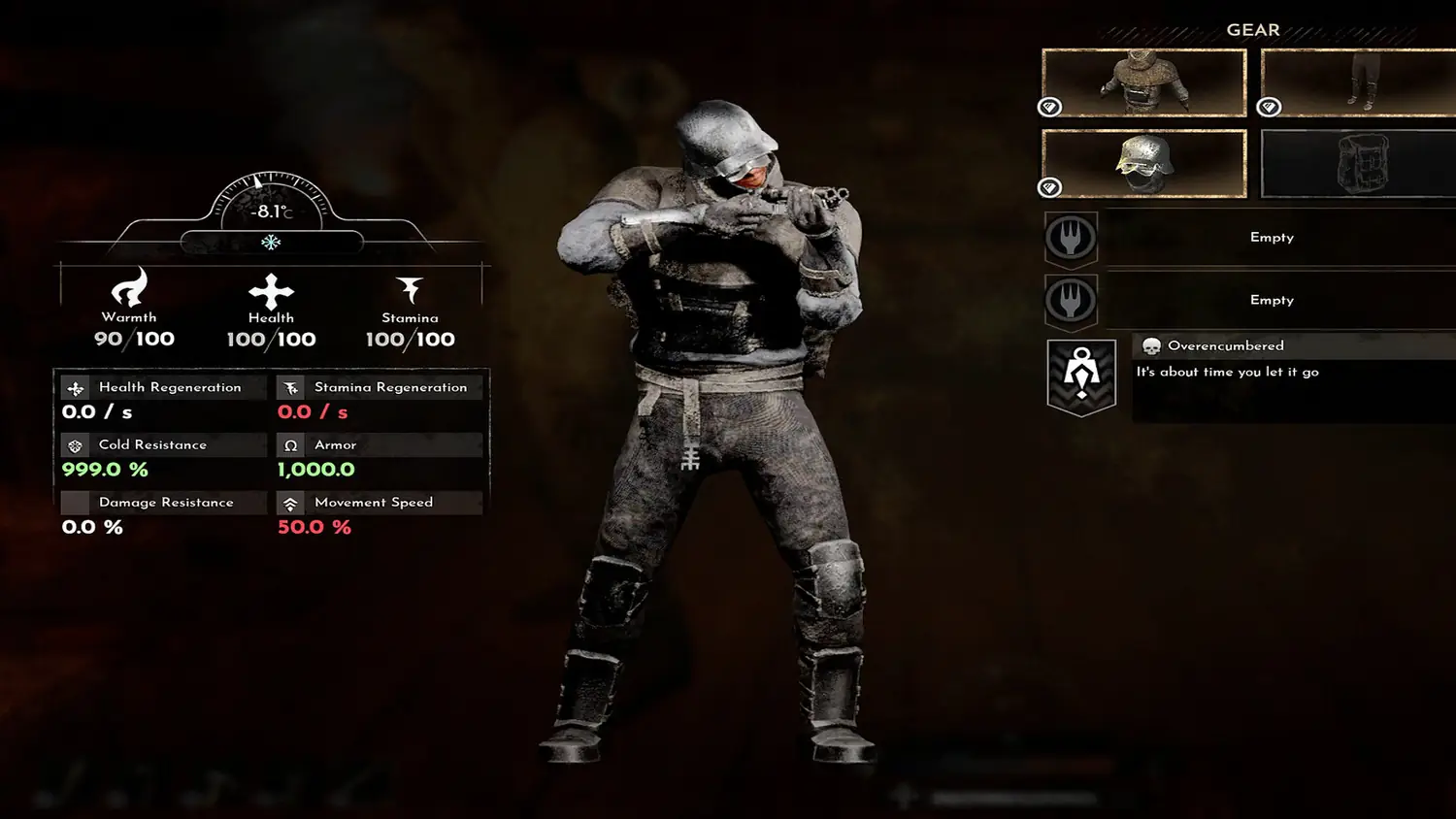
The character sheet separates Cold Resistance from Armor and Damage Resistance. High cold resistance does not stop a Revenant's club. Do not read the 999% figure on the starter suit as invulnerability — it only describes cold.
Phase 5: The bunker (20 minutes)
- Craft a torch. Branches are the main ingredient. The bunker is dark; without a torch you will miss containers.
- Craft the makeshift crowbar. Used to pry boards off the bunker entrance.
- Open the boarded entrance. The prompt reads something close to "search the unknown for a hidden shrine". Pry the boards and go in.
- Search the bunker shrine. The shrine room is the demo's closing beat. Interacting with the shrine triggers the bunker shrine event; the inscription warns that taking it calls a reckoning on you, and that the bunker seals after the last person leaves.
That is the end of the demo's authored content. You can keep scavenging, but no further objectives appear.
Objective order at a glance
| # | Objective | Gate |
|---|---|---|
| 1 | Gather logs, warm up in station | — |
| 2 | Craft primitive club, kill first Revenant | Crafting menu unlocked |
| 3 | Craft wooden mallet | Club crafted |
| 4 | Board train, place sorting table | Mallet crafted |
| 5 | Recycle an item | Sorting table placed |
| 6 | Load fuel, ignite Eden Engine, set valve | Hatch opened |
| 7 | Release brake, set throttle, clear junction | Engine ignited |
| 8 | Eat food | Hunger timer running |
| 9 | Craft toolmaker's workbench + wrench | Logs + scraps |
| 10 | Build exterior wall, seal a room | Mallet + materials |
| 11 | Craft zip gun + ammunition | Workbench built |
| 12 | Kill 3 Revenants | Gun loaded |
| 13 | Craft 2 small heaters, warm sealed room | ~10 metal scraps |
| 14 | Craft torch + crowbar, open bunker | Branches + metal |
| 15 | Search bunker shrine | Bunker opened |
What to do if you get stuck
- Engine will not build pressure: you loaded fuel but did not ignite, or the heat valve is fully closed. Open the hatch, confirm the fuel, ignite, then raise the valve.
- Train will not move: brake still on, throttle at zero, or pressure not built yet.
- No crafting prompt: some stations require you to be standing at the correct side, and the build tool must be equipped for placement.
- Cannot sprint: check weight. Anything over 40 triggers Overcumbered.
- Freezing indoors: the space is not sealed. Add walls and a door, then place a heater.
For a strategy-level overview of the same content, read the beginner guide. For keys and panels, see controls. The engine deserves its own page: Eden Engine upkeep.
FAQ
Where does the Frostrail demo end? The demo's scripted path ends after the first bunker: you break the boards off the entrance, loot the interior and reach the shrine room. The train remains drivable afterwards, so you can keep scavenging the surrounding map instead of closing the game.
Is the demo the same as Early Access? No. The demo is a slice of the Next Fest build with a tutorial and one bunker. Early Access in Q4 2026 is planned to carry progression between levels, more biomes and more enemy variants, according to the Spring 2026 development update.
Can I skip the tutorial? The tutorial objectives are tied to the opening station and the train, and the demo does not expose a skip option in its menus. If you already know the systems, you can complete the chain quickly: logs, club, Revenants, mallet, train, sorting table, Eden Engine, throttle.
Sources
Official reference: Frostrail on Steam for the store page, system requirements and supported languages, and the Frostrail Demo page for the build tested here.
More Frostrail Guides
Frostrail Eden Engine guide: hatch, fuel, ignition, pressure and consumption gauges, heat valve settings and how to avoid stalling the locomotive.
Frostrail enemies: Revenant aggro, the charge when shot, group sizes, melee and zip gun counters, and which enemy types are still unconfirmed.
Frostrail release date: Early Access lands in Q4 2026 with no exact day or price. Confirmed timeline, launch features and what is still unknown.
Frostrail resources: metal, wood and textile scraps, sorting table conversions, the best fuel and farming routes that respect the 40 weight cap.
Frostrail survival: warmth versus health, sealing a heated room, fuel choices, food, bandages, cold damage and the 40 weight Overcumbered cap.
Frostrail system requirements from Steam: Windows 10 64-bit, 16 GB RAM and RTX 3060 minimum, 32 GB and RTX 4060 recommended, 25 GB storage.
Frostrail train upgrades: every station and structure you can install in the demo, three carriage layouts and announced Early Access upgrades.
Frostrail weapons: primitive club, metal hammer, crowbar and zip gun, ammo economy, reload discipline and why no demo damage numbers exist.